
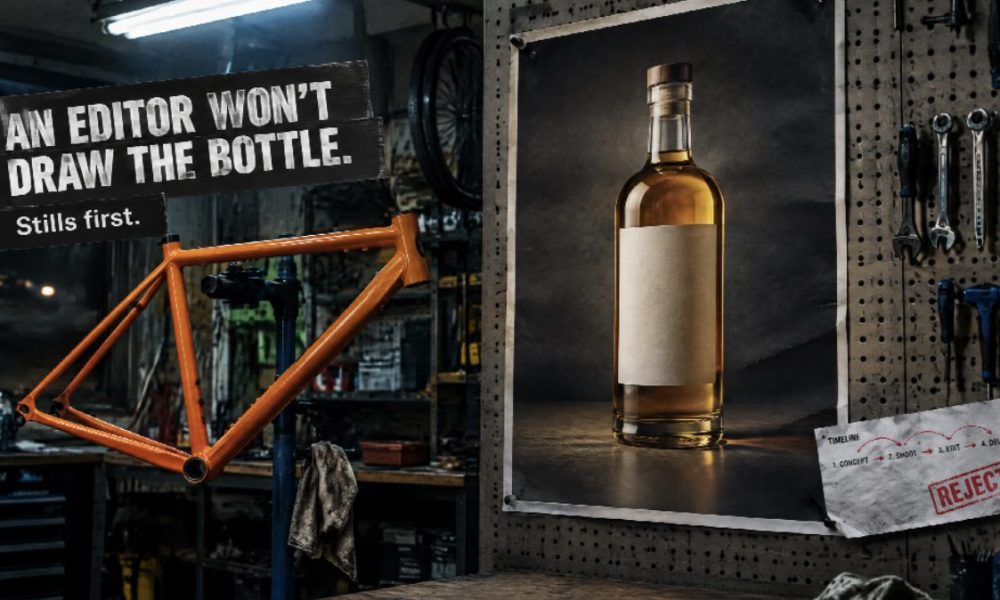
Rework is the most expensive line nobody budgets for.
Picture a small ecommerce brand. The offer changes, the packshot still carries last month’s headline, and someone uploads it to a video editor hoping the software will somehow conjure a new campaign. It won’t. An afternoon of paid staff time later, the team is deep in a timeline trying to disguise a misspelled word with motion. A sensible GPT Image 2.5 workflow exists to stop exactly that kind of spend — by keeping apart two jobs that most software budgets lump together.
Most tools in this category are sold as editors. You already have footage, a screen recording or a talking-head take; the software trims, captions, steadies the picture and formats the file for a phone. That’s a real job. It’s also a different job from making the still in the first place.
Two budget lines, not one “AI content” tab
When those jobs collapse into one “AI content” sentence, people buy the wrong thing. They upload a packshot with an out-of-date headline and expect the editor to invent a campaign. Or they generate a poster, skip reading the type, and burn an afternoon hiding the error with motion. An image model won’t cut your A-roll. An editor won’t put the right bottle on a blank page.
So treat them as separate line items.
This piece covers the stills side: what an image model is for, where it sits next to software you already pay for, and what it won’t do.
What you’re actually buying
An AI image model takes a prompt — often with a reference picture — and produces or revises a still. The ones worth paying for are judged on a single test: does a second edit still look like the first? Same product count, same materials, same camera, same layout. They aren’t NLE replacements (NLE meaning non-linear editor, the timeline software video people live in). They don’t analyse a clip for highlights, suggest cuts or write captions for Reels.
Browser editors, desktop suites and auto social-cut tabs all assume you already have pixels worth cutting. If you do, start there; you’ve already paid for those tools. If you don’t — if the next asset is a poster, a 4:5 campaign frame, a packshot that has to carry a new offer — you’re in image territory. Treat that as a video problem and the object drifts before anyone presses export. Expensively.
GPT Image 2.5 is OpenAI’s image model, and you can reach it through a hosted workspace rather than only a chat window. For a production budget, that difference counts: repeated edits, saved references, and a file you can hand to an editor later. It doesn’t make the model a studio, though. Nor does it make the output automatically legal to run as an ad.
The real cost sits in the frame
Short-form platforms reward frequency, and that pressure lands squarely on budgets. The cheap answer has been to automate the edit. The quieter bottleneck, for shops and campaigns alike, is usually the frame the edit is built on.
A social clip that starts from an honest still can be recropped, captioned and cut down. A clip that starts from a generated scene with the wrong lid can’t — it’s a write-off. Agencies running variants for two clients don’t need twenty automatic colour grades. They need the product geometry to survive the third revision, because every revision that fails is time nobody can bill for. Educators making a simple diagram need the numbers on the slide to stay the numbers they wrote.
Speed without that check? Just faster mistakes.
Precision here is less about “emotional cues” in footage and more about whether the label is still readable after you change the crop.
Where GPT Image 2.5 earns its keep
In practice, the differences people notice on GPT Image 2.5 are boring. That’s the point — boring is cheap. Output holds up at larger sizes without looking like a soft upscale. Colour is less likely to fall apart when you come back for a fourth pass. Prompts that spell out counts, materials, camera direction and layout tend to keep those constraints rather than swapping them for a prettier table. Skin, fabric, packaging and product edges stay steadier across a set.
In money terms, a GPT Image 2.5 workflow pays off on a short list of jobs:
- Marketing posters where the headline has to be typed, then read back character by character.
- Product frames reused in a lookbook, a PDP (product detail page) and later a video. One asset, three outings.
- Local edits: change the offer, fix a reflection, recrop for 4:5, leave the bottle alone.
- A small campaign set that has to share lighting and geometry, not just a mood.
What it isn’t: a talking-photo engine, or a caption generator. It’ll still invent letters if you don’t check the type. Arabic, English, or a slogan that “looks done” can still be wrong. And if the fourth edit wrecks a label you’d already approved, the brief or the folder is messy… the model didn’t owe you a miracle.
Credits, rights and the small print
Eligible trials, where they exist, run on credits you can see before you generate. That’s not unlimited free, so budget for it like any other consumable. Commercial use still depends on the plan — and on whether you had rights to the reference files in the first place. Skip that check and whatever you saved on production can vanish into a legal bill.
A workflow that protects the budget
The GPT Image 2.5 workflow that actually works is unglamorous. Lock the still first. Export something you’d be willing to print. Then take that file into whichever editor you already trust for pacing, captions and platform ratios.
If the idea has no object yet, say so and make a concept frame. If the idea is inventory, attach the approved photograph rather than describing the product from memory. Mixing those two briefs is the usual way a “campaign visual” quietly turns into a different SKU, and that’s an expensive correction to make after launch.
Ratio belongs in the same note as the copy: 4:5 for a grid, 9:16 if the still has to live on a story before anyone adds motion. Auto-export to every network is how type falls off the edge. Music, voice and subtitles are editor problems; they shouldn’t be used to hide a still you wouldn’t ship silent.
Who’s spending on it, and why
Social teams reach for an image model when the week needs a new key visual, not when yesterday’s vlog needs trimming. Marketing shops use it for poster variants while the motion editor works on a separate cut. Ecommerce teams use it when the packshot is almost right and the offer changed — far cheaper than rebooking a shoot. Teachers use it for a diagram that has to stay accurate, then drop that diagram onto a slide or into a screen recording.
None of that replaces a camera you’ve already booked, or a designer working in a real layout file. If the deliverable has to stay a layered PSD, stay in the layout tool and only generate the missing piece. Why pay twice for the same file?
Five mistakes that waste money
Treating every AI tab as interchangeable. An editor that suggests cuts isn’t an image model. An image model that holds a bottle isn’t a video extender. Subscribe accordingly.
Accepting the first still because it looks expensive. Read the text. Count the objects. Check the logo.
Feeding it a face you don’t have the right to use, then calling the result a testimonial.
Changing too many things in one pass. A new headline and a new pack is two edits, not one prompt that “improves everything” — and a failed mega-prompt still spends credits.
Skipping a last look on a phone. Campaign frames are judged at the size they’ll actually run.
What’s next, minus the roadmap poetry
Image models will keep getting better at layout, and at not destroying an approved region on the next turn. Editors will keep getting better at captions and at cutting footage you already own. The useful future (and the saner spending plan) keeps those two layers distinct and lets them hand files to each other, rather than paying for one button that claims to be a content department.
Already have an editor that works? Keep it. Reach for an image model when the still is the thing that’s wrong, and build a GPT Image 2.5 workflow around the moments when that still has to survive another edit, another crop and a human reading the type. Then cut the video in the tool you already know — but only once the frame would stand on its own.
 Bitcoin
  Ethereum
  Tether
  BNB
BNB  USDC
USDC  XRP
XRP  Solana
  TRON
TRON  Lido Staked Ether
  Cardano
  Gram (prev. Toncoin)
  Avalanche